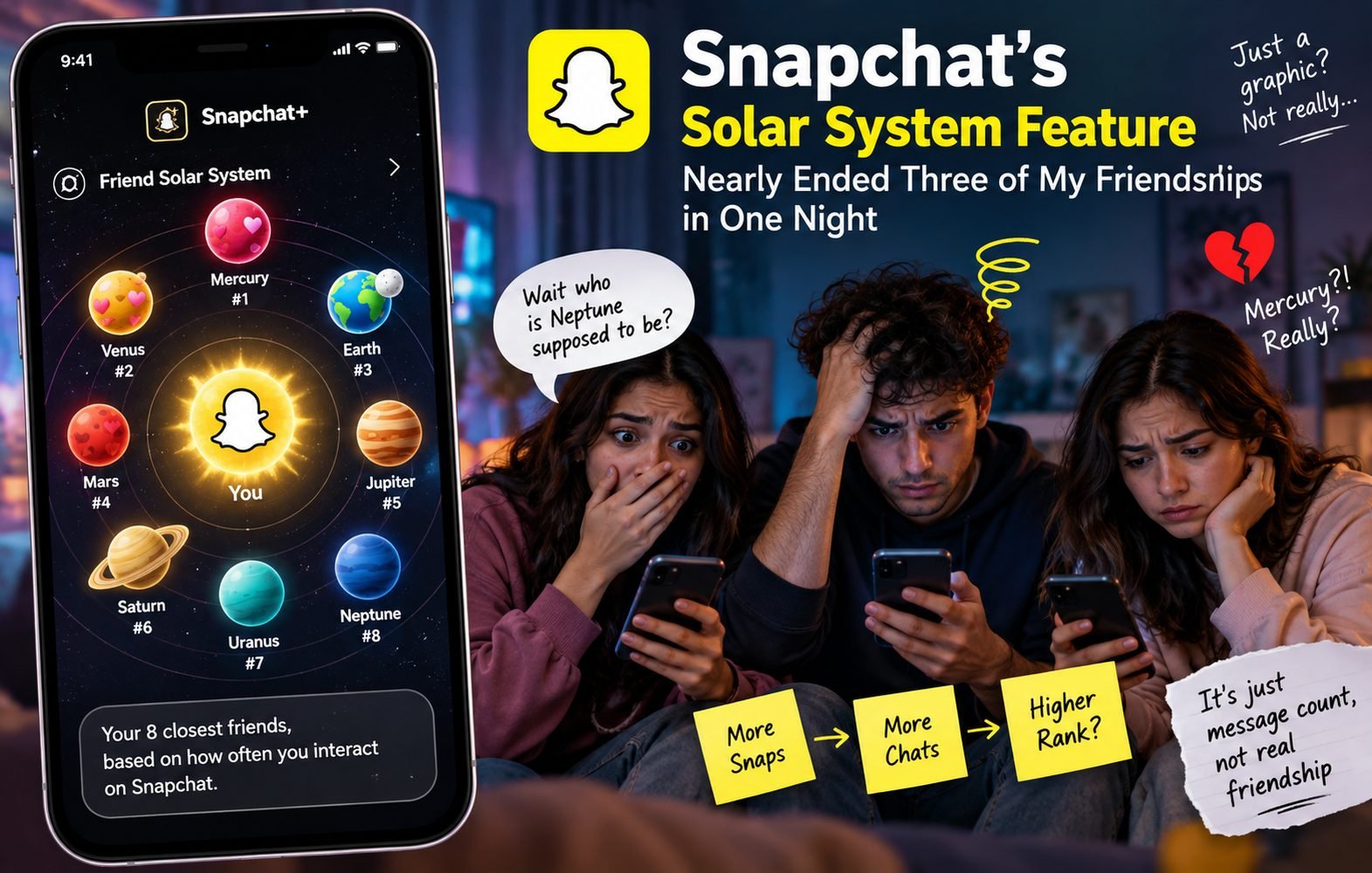
Last month, three of my closest friends all found out, within the same hour, that none of them were my Mercury. One texted the group chat “wait who is Neptune supposed to be” and it went downhill from there. Nobody got over it that night. That’s the power of a feature that’s technically just a colorful graphic, and it’s why I think everyone using Snapchat+ should understand exactly how it works before they turn it on.
What the Snapchat Solar System Actually Is
The Snapchat Solar System, also called Snapchat Planets, is an opt in feature available only to Snapchat+ subscribers. It ranks your eight closest friends based on how often you actually interact with them in the app. You’re placed at the center as the Sun, and your top eight friends orbit around you. The closer a friend planet sits to your Sun, the more frequently you’re exchanging snaps and messages with them.
How It Actually Calculates Your Rankings
The system runs on Snapchat’s engagement tracking in the background. It counts direct photo and video snaps, text chats, and active Snap Streaks to work out who you talk to most. Then it ranks your contacts against each other, most engagement takes slot number one, the next takes slot two, and so on down to number eight.
Here’s the part that caused my three way friendship crisis. Rankings are non mutual and completely private. If my friend Alex is my number one, he shows up as my Mercury. But if Alex talks to three other people more than he talks to me, I might show up on his screen as an Earth or a Mars instead. Because visible rankings like this tend to hurt feelings, Snapchat turns the feature off by default for every new subscriber. You have to manually switch it on in your Snapchat+ settings.
| Rank | Visual Description | Planet | Friendship Meaning |
| #1 | Reddish pink planet with bright red hearts | Mercury | Your number one best friend, the person you snap and chat with the most |
| #2 | Golden beige planet with colorful floating hearts | Venus | Your number two best friend, very high daily interaction |
| #3 | Classic blue and green planet with a glowing moon | Earth | Your number three best friend, strong and active connection |
| #4 | Red-orange planet with purple and pink hearts | Mars | Your number four best friend, frequent and steady interaction |
| #5 | Large orange planet with distinct storm stripes | Jupiter | Your number five best friend, moderate interaction |
| #6 | Yellow-orange planet with prominent golden rings | Saturn | Your number six best friend, lower frequency but still in the top eight |
| #7 | Greenish-cyan planet without floating hearts | Uranus | Your number seven best friend, inconsistent messaging |
| #8 | Dark icy blue planet, cold and distant | Neptune | Your number eight best friend, minimal weekly contact |
When My Friends Found Out Where They Actually Stood
None of the three had ever checked their own ranking before that night. Once one person looked, everyone looked, and that’s when it got messy. Two of them landed on each other as Uranus and Neptune, the two lowest of the top eight, and both took it personally even though the difference between spot seven and spot eight is genuinely tiny in terms of actual messages. The third had assumed she was my top friend for over a year and found out she was sitting at Jupiter. None of this reflected how any of us actually felt about each other. It reflected who sends the most blank streak snaps at midnight.
How to Check Your Own Ranking
Open Snapchat with an active Snapchat+ subscription. Go to a friend’s profile from your chat list and tap their icon or Bitmoji. Look for the Best Friends or Friends badge with a gold ring around it. Tap the badge to see which planet represents your spot in their top eight, or their spot in yours.
Where This Actually Comes in Handy
Outside of the drama, there are a few real uses. It gives a quick visual read on who you’re genuinely talking to most during a busy week. Social media managers and project leads sometimes use it to notice who responds fastest to direct messages. And it’s a decent reminder that social platforms track message count, not the depth of a relationship.
What People Are Actually Saying About It
Reddit and TikTok discussions show a genuinely mixed reaction. A lot of users describe what amounts to a Snapchat anxiety spiral, getting upset on finding out they’re ranked lower, a Jupiter or a Saturn, than they assumed. There’s a steady stream of memes about the one sided reveal, realizing someone is your Mercury while you sit at their Neptune. And tech leaning threads keep pointing out the same flaw, the algorithm rewards quantity over quality. Sending thirty quick blank snaps to protect a streak boosts someone to Mercury much faster than actual meaningful conversation ever would.
The Good and the Bad
On the plus side, it adds a fun, customizable layer to a normal messaging list, it replaces plain numbers with a clear visual, and it’s a genuine perk if you’re already paying for Snapchat+. On the downside, it can cause real hurt feelings when ranks get compared, it sits behind a paywall, and it measures app usage and streak habits, not real friendship or loyalty.
Before You Turn It On
Direct snaps count far more toward your ranking than watching public stories. The feature is off by default, so if you have Snapchat+ and see nothing, it’s just sitting disabled in settings. Rankings shift constantly, a heavy weekend of snapping someone else can knock your spot down instantly. And landing in someone’s Neptune orbit doesn’t mean they don’t care about you, it just means you don’t trade rapid fire snaps as often.
Fast Answers
Can non subscribers see my Solar System? No, only active Snapchat+ subscribers who’ve toggled the feature on can view planet badges on profile pages.
Why did my planet rank drop suddenly? Rankings update constantly. If your messaging frequency drops, or a friend starts chatting with someone else more, your planet moves farther out.
Is it actually accurate? It’s accurate for measuring message frequency and snap count. It was never built to measure real world closeness.
How do I turn it off? Go to your profile, tap your Snapchat+ badge, find the Friend Solar System setting, and switch the toggle off.
As for my three friends, we’re fine now. But I’ve made a rule for myself, I don’t check anyone’s ranking unless I’m ready for the answer.
Also Read : Send a Snap with the Cartoon Face Lens Using Snapchat