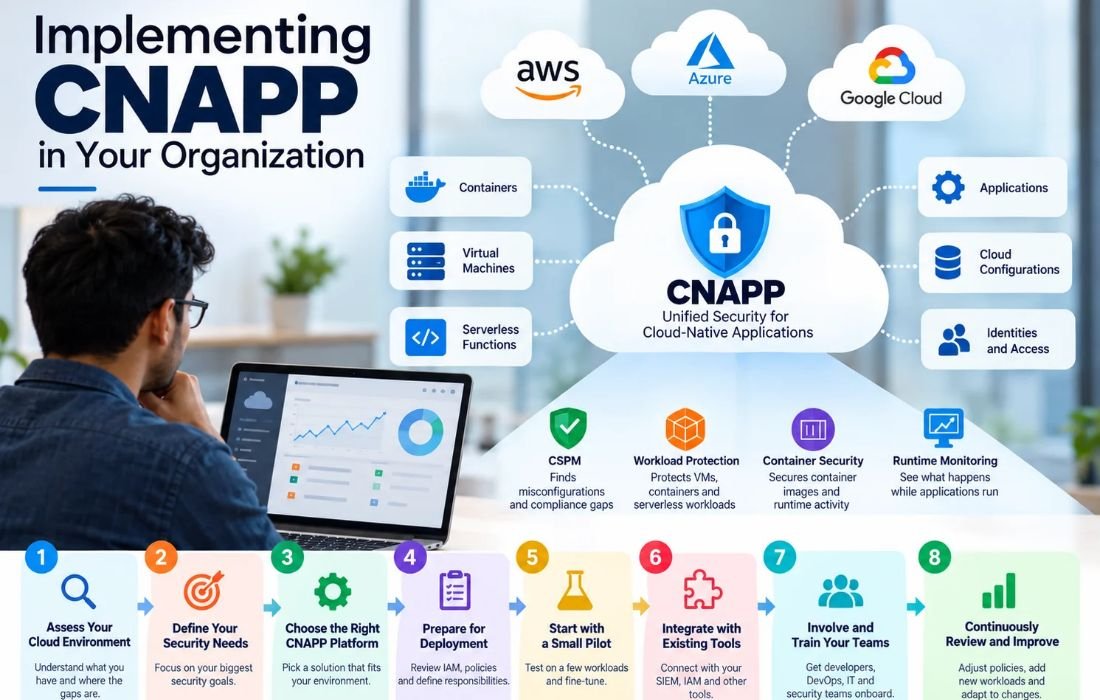
Let’s say your organization is using the cloud for almost everything.
You have applications running in AWS or Azure. Your developers are working with containers. Some workloads are running on virtual machines, while others use serverless functions.
And all of this keeps changing.
A developer deploys a new application. A container gets created and removed. Someone changes a cloud configuration. A new workload is added.
That is great for flexibility and speed, but it also creates a security challenge.
How do you keep track of everything?
How do you know whether your cloud resources are configured securely? How do you spot vulnerabilities before they become a problem? And how do you know what is happening when your applications are actually running?
This is where a Cloud-Native Application Protection Platform, or CNAPP, can help.
CNAPP brings cloud security tools together to protect applications across their lifecycle. But implementing it takes more than just turning it on.
You need to approach it step by step.
Start with your cloud environment
Before you start comparing CNAPP solutions, look at what you already have.
- What cloud platforms are you using?
- What workloads are running there?
- Do you have containers and serverless functions?
- How many cloud accounts do you manage?
- Are you also working with on-premises infrastructure?
- And perhaps most importantly, how often does all of this change?
Cloud environments are constantly moving. Workloads change quickly, with new resources added and applications updated often. This is one reason traditional security tools can struggle to keep up.
You may also have several security tools already. One tool might monitor cloud configurations, another might protect workloads, and another might handle compliance.
So before adding another platform, understand where your current tools are helping and where they are leaving gaps.
Figure out what you actually need
Once you understand your environment, think about what you want CNAPP to help you with.
You might need better visibility across your cloud accounts. Maybe you are worried about misconfigured resources. Or perhaps your security team wants better protection for containers and workloads.
You may also want to bring security into the development process so issues can be found before applications reach production.
CNAPP can bring these capabilities together:
- Cloud Security Posture Management: Finds misconfigurations, vulnerabilities, and compliance gaps.
- Workload protection: Helps protect virtual machines, containers, and serverless workloads.
- Container security: Helps secure container images, orchestration environments, and runtime activity.
- Runtime monitoring: Helps you see what is happening while applications are running.
- Automated remediation: Helps address certain security issues automatically.
- DevSecOps integration: Brings security into development and deployment workflows.
You do not need to focus on everything at once. Start with your biggest security needs.
Now, build your implementation plan
Once you know what you need, you can start putting your plan together.
Decide what success looks like
First, ask a simple question:
What do we want CNAPP to help us achieve?
Maybe you want better cloud visibility. Maybe you want to improve compliance. Maybe you want to find vulnerabilities earlier or reduce the amount of manual security work.
Write those goals down. Then decide where you want to start.
If you have hundreds of workloads, you probably do not need to protect all of them on the first day. Start with the workloads that are most important to your business.
Take a proper look at what you already have
Now it is time to take stock.
List your cloud accounts, workloads, containers, serverless functions, and other important resources.
Then look at your existing security tools. Ask questions such as:
- What are these tools already monitoring?
- Where are the gaps?
- Are multiple tools doing the same thing?
- What information does the security team have to collect manually?
This gives you a much clearer picture of where CNAPP can fit into your existing setup.
Choose a platform that fits your environment
This is where you can start evaluating CNAPP solutions. But do not choose one simply because it has a long list of features.
Think about your actual environment.
- Does it support the cloud platforms you use?
- Can it protect your workloads and containers?
- Does it integrate with your CI/CD tools?
- Can it connect with your existing security platforms?
- Does it support automated remediation?
And there is another question worth asking:
Will your teams actually be able to use it easily?
A platform that is difficult to deploy or manage can create more work for your security team.
Get things ready before deployment
Before deployment, review your IAM, cloud policies, monitoring, and governance. Also decide who is responsible for what.
- Who will manage the CNAPP?
- Who will investigate alerts?
- Who can approve automated remediation?
- Which teams need access?
Sorting this out early can prevent confusion later.
Start with a small pilot
You do not have to roll CNAPP out everywhere immediately. Start with a few workloads.
- Set up your policies and alerts.
- Configure your dashboards.
- Test automated remediation where appropriate.
Then watch what happens.
- Are you getting useful alerts?
- Are you getting too many alerts?
- Are some policies creating unnecessary noise?
- Are the findings easy for your teams to understand?
This is where a pilot becomes useful. You can make adjustments before expanding CNAPP across the rest of your environment.
Connect it with your other security tools
Your CNAPP should not sit on its own.
Your organization may already use a SIEM, IAM tools, endpoint security, antivirus, or other monitoring platforms. Where appropriate, connect these tools with your CNAPP.
That way, your security team can bring information together instead of jumping between different platforms every time something happens.
The idea is to make security easier to manage, not create another isolated system.
Bring your teams into the process
This is an important part of CNAPP implementation. It is not just a security team’s job.
Developers need to understand how security fits into their development process. DevOps teams need to know how policies affect deployments. IT teams may need to work with cloud configurations and alerts.
Give everyone the training they need.
The goal is to make security part of the way teams work instead of treating it as something that happens separately.
Keep checking and improving
Finally, do not treat CNAPP as a project that ends once the platform is deployed.
Your cloud environment will keep changing. New workloads will appear. Applications will be updated. Teams will change their workflows. Your security requirements may change too.
So, keep reviewing your policies, alerts, compliance findings, and remediation rules.
- If an alert is not useful, adjust it.
- If a new workload needs protection, include it.
- If your environment changes, update your CNAPP configuration.
The idea is simple: your cloud environment changes, so your security approach needs to keep up.
A few things to keep in mind
There are a few other areas worth thinking about as you roll out CNAPP.
Using multiple clouds? Make sure you can manage security consistently across environments such as AWS, Azure, and GCP.
Have a hybrid environment? Choose a solution that will allow you to see both your on-premises and cloud environments.
Want less manual work? Automation can help with certain vulnerabilities, misconfigurations, and policy violations.
Working with DevOps teams? Make sure security is included in the development and deployment process rather than added at the very end.
Have compliance requirements? Make sure your CNAPP can continuously check the controls you need to meet and provide useful reporting.
Where does Fidelis Halo® fit in?
Fidelis Halo® brings several of these cloud security capabilities together.
It provides workload protection for servers, virtual machines, and serverless workloads. It also includes container security, CSPM, automated remediation, and Heartbeat monitoring.
Halo can work across AWS, Azure, and GCP environments. It can provide visibility into resources such as virtual machines, storage, networking, containers, serverless workloads, and identity-related configurations.
So instead of managing different parts of your cloud security separately, you can bring several of them together through one platform.
Bringing it all together
Implementing CNAPP does not have to happen all at once. Assess your environment, identify gaps, choose the right platform, and start small.
Once you know what is working, expand it.
Connect CNAPP with the tools your teams already use. Get your developers, DevOps, IT, and security teams involved. And keep reviewing your policies and configurations as your cloud environment changes.
That way, CNAPP becomes part of your everyday cloud security process instead of just another security tool sitting in your environment.
Also Read : Cloud Data Security: Cloud services Where Are We?